Some good news, I’ve been talking to two developers now and got them working together, we just had a meeting with the guys behind an existing large (millions of users) site similar to Tumblr, with a vibrant and open-minded community, and more importantly, it has open-minded owners who believe in free speech. They think we can get something done here to rescue the whole community.
I’m not allowed to reveal the site name yet. I can tell you it’s mainstream, open to everyone, open-minded and welcoming. (It’s not WordPress or any site owned by Facebook or Twitter. It’s not Pillowfort, that’s in closed beta. It’s not Ello, that’s mainly for artists. It’s not kinkspace or fetlife, those are too specialist. It’s not jux, that seems to be closed. It’s not Soup, that seems still in development and too small.)
One of the reasons for delaying the announcement for next few days is they don’t want a “land grab” where people take the names of current popular Tumblr users over there (cyber squatting). So they are looking at ways for existing Tumblr users to keep the same names on the new site.
More info over the days to come.
The plan is, broadly:
1. By December 9th, announcement of the new site and how to secure your username there
2. By December 10th, an online tool for bloggers to copy their existing content to the new site automatically, with the same tags and captions.
3. Bloggers will need to copy their content across between December 10th and December 17th if they want to use the automatic tool.
4. My understanding is that after December 17th there will be no public access to any “flagged” posts on Tumblr, but the original poster will still be able to see the flagged post (for a short time at least). Therefore, the original poster may still be able to manually download a post to their own PC or phone, after December 17th, and manually upload it to the other site. But if you have lots of posts that will take a long time, it will be better to use the automatic tool before December 17th.
Please understand that these dates are approximate and may change for technical or other reasons.
There may be a few rough edges or not so perfect looking site design on the transfer tool. Everyone is doing their best. The main goal here is to help as many people as possible preserve access to their content, in the short space of time Tumblr has allowed us, and preserve as much as possible of the Tumblr community spirit somewhere new.
The new site will cater for photo, GIF, text and html posts. It will not offer video and audio posts, due to cost reasons – maybe in future, but for now you will need to preserve video and audio content yourself in some other place.
If your Tumblr blog has a mixture of original content and reblogs, or all reblogs, all of that can be copied over to the new site. Reblogs will become “your” original content if nobody else posted them yet, otherwise they will be shown as reblogs. The devs are looking at ways to preserve attribution of reblogs back to the original Tumblr poster, if that person also moves to the new site.
Important: your Likes cannot be copied from Tumblr to the new site. You will have to go find the same posts again on the new site, and like them afresh.
(Similarly, existing reblog comments, asks, messages and other user interaction on Tumblr cannot be copied to the new site – that’s just too much to do, in the short time available.)
If you want to preserve any of your existing Liked posts on Tumblr, you will need to either: (1) download the post to your own PC, or: (2A) reblog it now to your own Tumblr blog, and then (2B) use the automatic tool, before December 17th, to move your whole Tumblr blog across to the new site.
If you have Liked a lot of posts here on Tumblr, the gridllr.com webapp should be able to help you do steps 1 and 2A quickly, I mean download or reblog.
(Someone complained to me today about the appearance of Gridllr on a phone. It’s best to use Gridllr on a PC, Mac or Tablet with a large screen.)
If you have liked a post here on Tumblr and the original poster decides to delete it, or even to delete their entire blog, some time before December 17th, then that post will be permanently lost. So if you want to be sure to preserve any of your Liked posts, you should best download or reblog as soon as possible. If it’s reblogged to your own blog it is safe from deletion, at least for next few days.
Obviously, you will lose access, after December 17th, to all past posts you have liked, if Tumblr has flagged them as NSFW. Again, the steps (1), or (2A) and (2B) covered above will be the only way to hold on to these posts.
Oh I so hope this works. It would be great to get this out so we can try to get as many people as possible all back in one place and not split up all over different platforms.
Please reblog
Here’s hoping
everyone who see’s this from Me PLEASE reblog this!
~Uncle R.
Guys, check this out.
We now have a plan to save this Tumblr community!
Help is on the way!
More to come!
I want to personally thank all those volunteers who are involved in this project.
WarriorMale
This sounds promising.
Here’s hoping this is legit.
I have no idea if this is real, but a reblog won’t hurt anything.
I’m skeptical but I’ll wait and see on the announcements due for the 9th & 10th before I make any judgement calls.
Sherlock being finally back in his own body after being bodyswapped with john: wow…. i feel strangely…. empty… and… relaxed….
Sherlock, back in his own body, approaching John a couple of days later to ask him to do that thing again that made his body feel … so relaxed …
And by the way john…. which handlotion did you use on my hands… they feel so smooth…
Wait till he finds out what else feels smoother than usual
For the two(three?) of you that actually read my shit, (thank you very much! I less than three you guys!) I will be logging off tumblr for a bit. Also gonna try to transfer my blog, probably over to WordPress if it lets me. Idk. I know I have random spurts of activeness, but I am completely logging out on all my devises. I will hopefully be back when tumblr realizes what a huge mistake they are making, but until then you can reach me on discord!!! Or instagram!
Please don’t fucking log off tumblr on the 17th as a protest. All that’s going to do is give tumblr more reason to shut this place down because of revenue loss.
Please don’t fucking log off tumblr on the 17th as a protest. All that’s going to do is give tumblr more reason to shut this place down because of revenue loss.
This is blatantly untrue
Companies do not experience one day of revenue loss and pull the plug, destroying years of work and firing dozens if not hundreds of employees.
Companies which experience loss in revenue and consumer interest make investments and changes in order to regain their users/customers. That’s why organized protests and boycotts WORK. Tumblr will NOT go down after one bad day or week, but they might be willing to listen to its userbase if we put up an organized protest. (If you don’t believe me, think about how long sites like MySpace and Google+ hang around with fractions of their previous user base, often for years.)
Yahoo paid over one billion dollars for Tumblr, and the website will not go offline because of a one-day event, so in conclusion,
DO log off on December 17th to show Tumblr that you disapprove of its recent content ban and clumsy execution of censorship.
Please reblog this version of the post to stop the spread of misinformation.
In case you’re not aware, Tumblr has recently announced that on the seventeenth of December they’ll start purging all porn and porn-adjacent content on Tumblr. Why does that matter to LWU, you ask? Well, they’re using their bots to identify it, and we’ve all seen how well THAT works. One of my Wander posts even got flagged as sensitive for no apparent reason. What I want to do is reassure you all that I’ve taken steps to back up all of the content on LWU to my hard drive using a tool I was recommended a couple weeks ago. I’m going to continue to do so on a regular basis just in case, so there’s very little chance that my stuff will be lost.
I’m using this one! It condensed my entire blog as of November 20th into one 4.36 gigabyte folder.
Any notes on how to use it? I can’t figure it out.
Okay, so here’s how to do this.
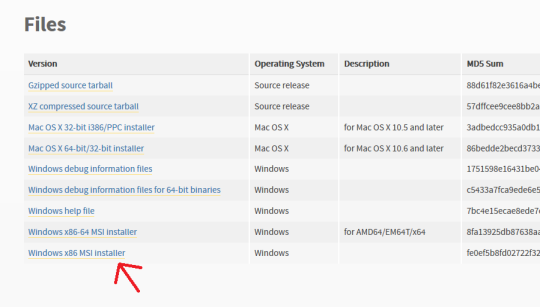
First off, go here and make sure you have Python installed. For Windows it should be the very bottom link, the x86 MSI Installer. You don’t have to do anything but install it.
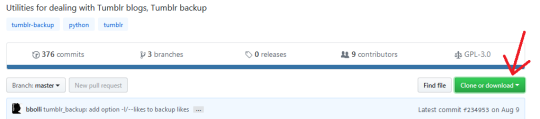
Second, go here, and click “Clone or Download” (the green button on the right). Select “Download ZIP”.
Make sure you have WinRAR or 7zip or something installed that lets you extract zip files.
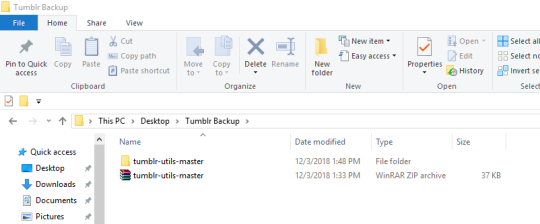
Next, make a folder on your desktop. I named mine “Tumblr Backup”, and in the following instructions I’m going to assume that’s what you’ve named yours as well; replace “Tumblr Backup” with whatever you name yours if it isn’t.
Drop the zip file you downloaded into Tumblr Backup. Go in and extract it; this should create a folder called “tumblr-utils-master“.
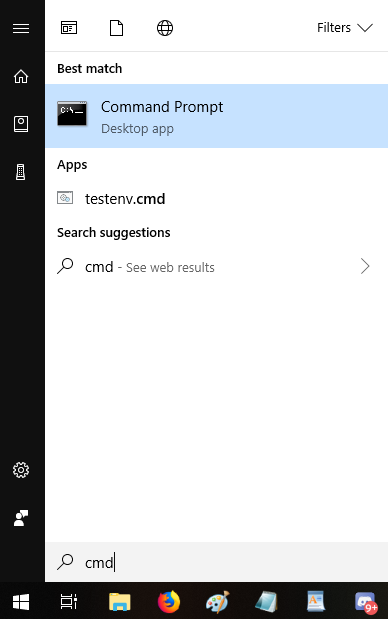
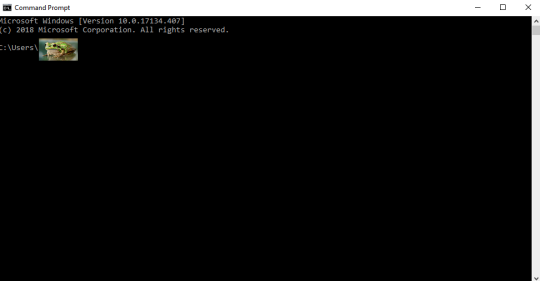
Open your Command Prompt. If you don’t know how to find that, click your start menu button and type “CMD”, which should give you this:
That should open this:
That frog over there is blotting out my profile name on my computer. Whatever your profile name is when you sign in (e.g. “Max” or “Snugglebuns” or “froglord69”) is going to be in that spot on the address path. If it instead says something about Windows and System 32, that’s okay, what I’m gonna tell you to do will go to the right place either way.
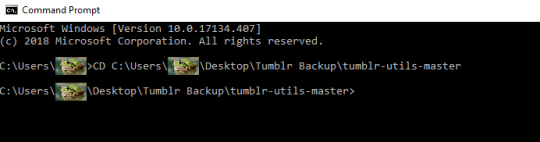
Next, input this command–keeping in mind that the parts in bold should be changed based on your profile name and what you named the folder on your desktop:
CD C:Usersfroglord69DesktopTumblr Backuptumblr-utils-master
There! Now you’re in the right folder! Next, enter this command, replacing the bolded bit with your own blog name:
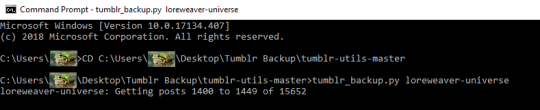
tumblr_backup.py yourblogname
You should see this:
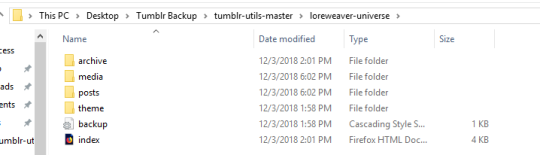
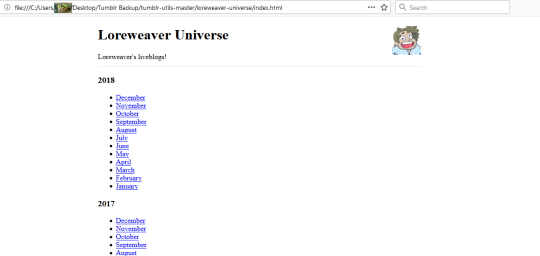
Then just…let it run! It took less than five minutes for my computer, though it will vary by processor and connection. Once it’s done, you’ll have something like this:
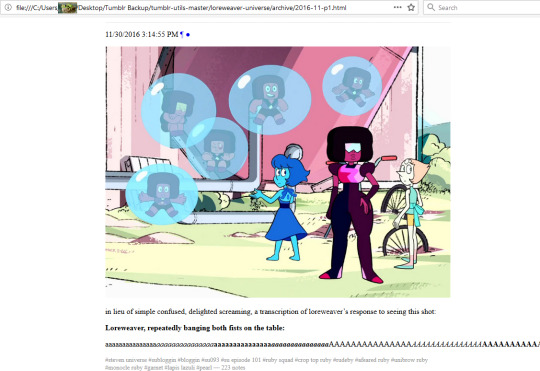
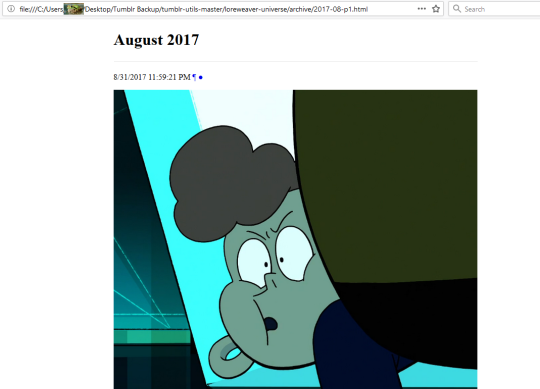
That “index” opens in an internet browser. It’s basically a webpage stored directly on your computer. Some pics of mine:
So…not pretty, but it’ll save the content of your posts. Hope this helps!
Spread this so as many people as possible can see it
Mac users:
Create a folder somewhere convenient and name it something like ‘Tumblr Backup.’
Download the script as described above. Save it to the folder you just created. Double click it, and it extracts in place.
open a terminal.app window. Terminal.app is located in your /Applications/Utilities folder. Usually, just typing command-space to bring up the spotlight window and then typing in ‘term’ and hitting return does the trick.
If you are not accustomed to UNIX command prompts, do not be scared. You got this.
At the ‘$’prompt, type in ‘cd’ and then space, and then drag and drop the decompressed tumblr-utils-master folder onto the terminal window. The path to that window should appear. Hit return.
Boom. You’ve switched to that folder. Type ‘ls’ to make sure. Should look like a list of the folder’s contents.
Type ‘./tumblr_backup.py [yourblogname]’ and hit return.
Boom. Your blog starts downloading. Go drink coffee, enjoy some porn, hang out with your dog, cat, other pet, or lover/s who may also be your pet/s, and let the script run. Depending on your connection speed and just how much of a pervert you are, this could take a while.
Mac instructions for you weirdo Mac users!
Oh thank gods, I needed those mac instructions. THANK YOU.
THIS WORKS!!! (Windows, at least. I haven’t tried Mac)



 Bootsrcool